


Isolated workspaces and work areas (beta)
Workspaces are still in beta - This means we are still developing and adding the full feature set.
Use workspaces to create separate work areas for different divisions or departments within your organisation where data separation is needed.
The top level in your account is the main workspace. Within each workspace you can add groups, resources and other information that is only visible in that workspace.
From your Account Settings > Workspaces page you can add new and manage existing workspaces.
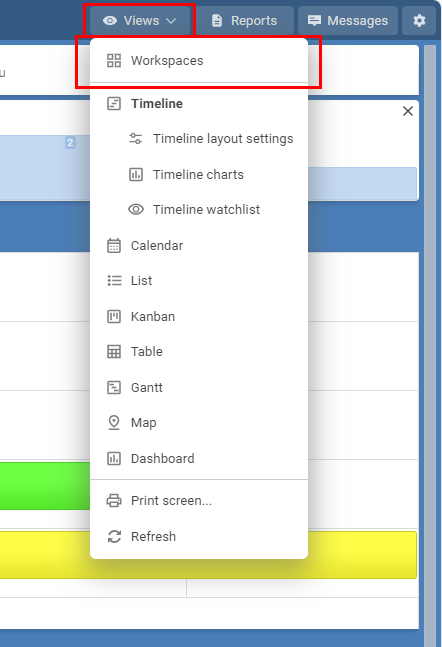
Every group, resource, filter, report, template and event created within a workspace are only visible when that workspace is being used.
User access
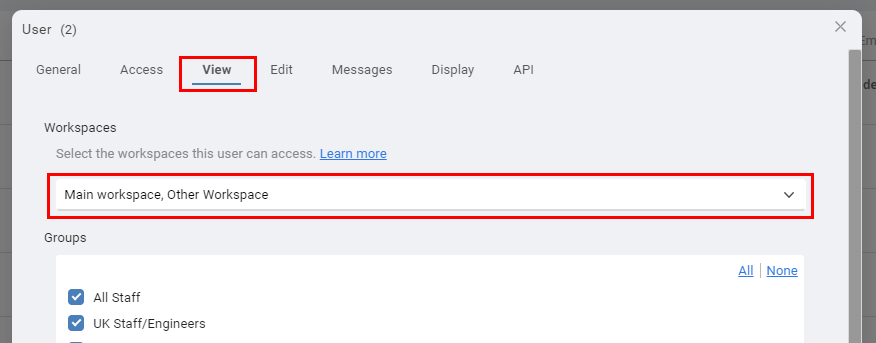
Within the view permissions tab of each user you can choose which workspaces each user can access.
Information that is unique to each workspace :
Groups
Resources
Resource Labels
Events
Filters
Reports
Templates
Special Days
Use workspaces to create separate work areas for different divisions or departments within your organisation where data separation is needed.
The top level in your account is the main workspace. Within each workspace you can add groups, resources and other information that is only visible in that workspace.
From your Account Settings > Workspaces page you can add new and manage existing workspaces.
Every group, resource, filter, report, template and event created within a workspace are only visible when that workspace is being used.
User access
Within the view permissions tab of each user you can choose which workspaces each user can access.
Information that is unique to each workspace :
Groups
Resources
Resource Labels
Events
Filters
Reports
Templates
Special Days
Still need help? Contact Us


Join Us - Live Webinar
...
Close
Help Topics
Search
Contact Us